
How to start an online store in South Africa: platform, payments, delivery and cost
What to decide, and in what order, to start selling online in South Africa: products, delivery, platform, payments and cost, with our prices incl. VAT and real stores as examples.
Here is how to start an online store in South Africa, in the order we would make the decisions: choose what you will sell first, work out how each order will reach the customer, pick the platform, connect a payment gateway, then build, test and launch. Delivery and payment come before the design, because they decide what the checkout has to do. With us, a store starts at R25,000 incl. VAT to build on our Professional package, and hosting is R450 a month.
We build online stores for South African businesses and look after them once they are live. Whether you are adding a shop to a business that already trades or working out how to sell online in South Africa for the first time, each section below takes one decision in turn.
The steps, in order
- Choose what you will sell first, with a photograph, description, price, weight and size for each product.
- Decide how orders will reach customers, and what each way of delivering costs them.
- Choose the platform and your domain name: a hosted platform you rent by the month, or WooCommerce on your own WordPress website, at an address such as yourshop.co.za. We register and renew domains, including .co.za, quoted per request.
- Choose a payment gateway, comparing what it charges and how it pays you.
- Build the store and test it, placing real orders on a phone and a computer.
- Publish your delivery and returns policy where customers can read it before they pay.
- Launch, then look after it: updates, backups and security keep it taking orders, and search brings new customers.
What should you sell first?
Start with a few products you know sell and travel well, not the whole catalogue. For each one you need a photograph, a description, a price and a stock count, plus its weight and size, which a courier’s fee can depend on. A smaller first range goes live sooner and shows you what customers actually order online.
Our Professional package loads up to 50 products from the details and photographs you supply, and loading more is quoted per task before we start. The words are yours too: we give you a structured content brief and one editing pass at no charge.
Not every product needs a courier. giftcardsandvouchers.co.za, one of the websites we built for GiftBucks, sells retail gift vouchers. Its home page says it aims to fulfil orders within 24 to 48 hours during office hours, though some may take longer, and its FAQ says the vouchers go out by email, by SMS or both, depending on the brand. If you sell appointments or classes, a booking website fits better than a store.
How will orders reach your customers?
Decide how each order will travel before you set a delivery fee. A South African store can send parcels door to door by courier, to a pickup point or locker, or by same-day delivery, or let customers collect; vouchers and downloads can go by email or SMS. You can offer several of these, each with its own fee.
| How the order travels | What happens | Suits |
|---|---|---|
| Door-to-door courier | Collected from you and delivered to the customer’s door, anywhere in South Africa | Most parcels |
| Pickup point or locker | The customer collects from a locker or counter when it suits them | Customers who are out during the day |
| Same-day delivery | Taken straight from you to the customer, without passing through a courier hub | Urgent orders |
| Collection | The customer collects from your premises | Local customers |
| Email or SMS | The voucher or download is sent to the customer | Vouchers and digital products |
What the customer pays for delivery
Here are three ways to charge for delivery; the two stores below use the first two.
- A flat fee, free above an order value. Smallies World, a WooCommerce store and a client since 2024, which we host and maintain, charges R149 for delivery on orders below R2,000 and delivers free nationwide on orders over R2,000, according to its shipping and returns page as at 2 October 2026. A flat fee is simple to show at checkout, and the store carries the difference when a parcel costs more to send.
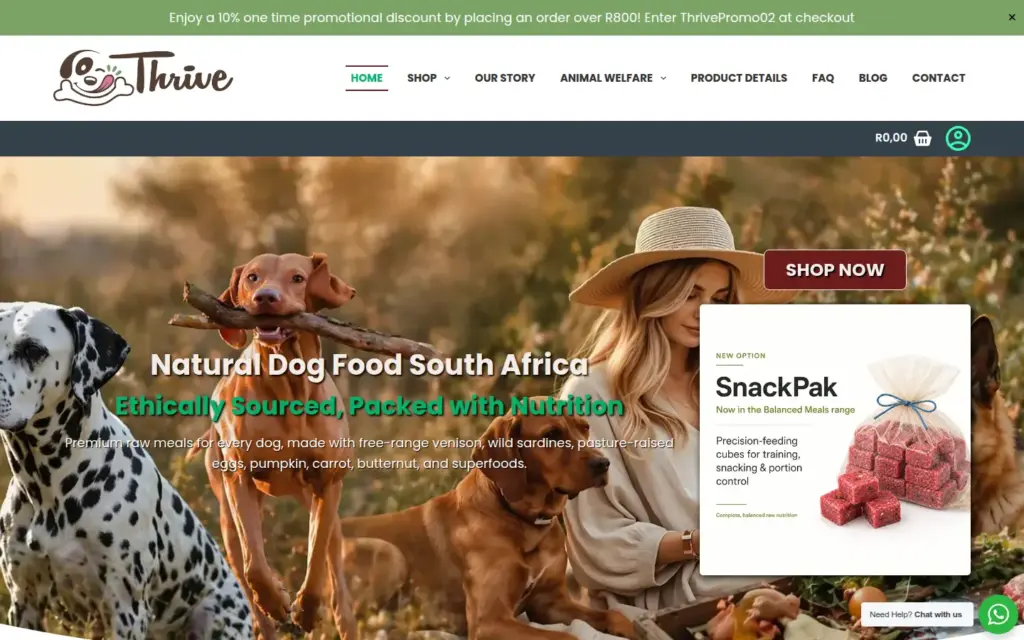
- A fee worked out from the parcel. Thrive Raw Food For Dogs, whose store we built in 2025, sells raw meals for dogs. Its delivery policy says the meals ship frozen, in insulated packaging with gel-ice packs; that the fee is calculated at checkout from weight, volume and destination; that same-day delivery is available in Gauteng; and that if the courier’s final cost comes to more than the amount calculated, the customer is contacted to pay the difference before the order is sent.
- A live rate at checkout. A shipping platform can show a real-time delivery price while the customer checks out. Bob Go’s integrations page lists real-time shipping costs at checkout, order syncing and tracking notifications for the stores connected to it.
In WooCommerce, the platform we build on, delivery rules are set by zone. WooCommerce’s guide to shipping zones says a zone can be as narrow as a list of postal codes or as wide as a country or a continent, and that customers see only the methods for their address. Three methods are built in: flat rate, free shipping and local pickup. The guide says a method beyond those is likely to come from a third-party extension or custom code.
Our Professional store includes one shipping method, set up for you, and more are quoted per task before we start. Weigh and measure your products before the build: a store can only work out a fee from the details it has.
Stock and returns
WooCommerce’s inventory settings let a store keep a count of each product and subtract items as sales are made, email you when stock runs low or runs out, and hide sold-out products from the shop.
If you make what you sell, the store is only half the job. Thrive keeps low levels of stock, makes orders fresh as they are received and asks customers to allow 5 to 7 days, according to its delivery policy. Alongside its store, we set up MRPeasy for Thrive: MRPeasy’s home page describes it as MRP software for small manufacturers.
Decide your returns rules before launch, and publish them with your delivery policy. What you sell shapes them. As at 2 October 2026, Smallies World accepts returns of unused items in their original packaging within 7 days of delivery, and says delivery usually takes 2 to 3 working days (its shipping and returns page), while Thrive, whose meals are perishable, does not accept change-of-mind returns (its delivery and returns policy).
Which platform should your store run on?
In practice the choice is between a hosted platform, which you rent by the month with the hosting included, and WooCommerce, free software that turns a WordPress website into a store, on hosting you choose. A hosted platform is the quicker start if you are setting it up yourself; WooCommerce keeps the store inside your own website.
| A hosted platform (Shopify, for example) | WooCommerce | |
|---|---|---|
| The platform | A monthly plan: Basic is US$25 a month, or US$19 a month paid yearly | Free to download and use, with no monthly subscription |
| Hosting | Included in the plan | Chosen and paid for separately |
| Taking payments through another provider | Third-party transaction fees may apply, at a rate that depends on the plan | No extra fee: you pay only the provider’s processing fees |
| The rest of your website | Built on the platform too | Your WordPress site, with the shop inside it |
We build stores on WooCommerce, inside a WordPress website we design for your business, so the shop and the rest of your site are one website. That suits a business that already has a website and wants its shop to be part of it. If you would rather test the idea on your own first, a hosted plan is the quicker way: on the same date, Shopify’s pricing page offered 3 days free, then US$1 a month for 3 months. If we build it, the store is yours: your website and its content are yours, and you can move them wherever you like.
Selling online is not new work for us: our website offered shopping carts in 2005. We have built custom business systems since 2001, and changed technology three times without changing what we do. WooCommerce vs Shopify for South African stores compares the two platforms in detail, and what a WooCommerce store really costs to run answers whether it is really free.
How will your customers pay?
Through a payment gateway: the service that takes the customer’s payment at your checkout and pays you, less its fee. As at 2 October 2026, South Africa is not among the supported countries for Shopify Payments or the countries where WooPayments is available, the two platforms’ own payment services, so a store here uses a third-party gateway either way.
Before you choose one, ask:
- Which payment methods does it offer? Card payments, and whatever else your customers use, such as instant EFT.
- What does it charge? Check its fees for each payment method you will offer.
- When does the money reach your business bank account?
- How do refunds work?
- Does it connect to your platform? A plugin for WooCommerce, or an app for a hosted platform.
Our Professional store includes a payment gateway, set up on your checkout. Taking payments online in South Africa compares the gateways for store owners, and what a gateway charges, how it pays out and what setting it up involves goes through the one we include.
What does an online store cost?
Building the store starts at R25,000 incl. VAT on our Professional package, typically ready in four weeks; hosting is R450 a month. A store that needs custom plugins, or links to your accounting or stock software, is custom work from R65,000, quoted after a free first discovery. Gateway fees, delivery and your domain come on top.
| Cost | With us, incl. VAT | What it covers |
|---|---|---|
| Building the store | From R25,000 | A WooCommerce store in a custom-designed site of up to 20 pages, up to 50 products loaded, a payment gateway and one shipping method, your existing site moved across, a staging copy, three rounds of revisions and 60 days of support |
| A store with custom plugins or integrations | From R65,000 | Quoted after a free discovery; detailed scoping is part of the build |
| Hosting | R450 a month | Daily off-site backups (restore included), SSL and uptime monitoring |
| Hosting and care | R975 or R2,450 a month | The hosting, plus updates, with a backup before each one, and Wordfence security monitoring; the higher plan adds two hours of changes a month |
| The payment gateway | A fee on each payment | Set by the gateway you choose |
| Delivery | Per parcel | Set by the courier; you decide how much of it the customer pays |
| Your domain name | Registered and renewed for you, quoted per request | Your store’s address; we register and renew domains, including .co.za |
What sits outside the package, and how each item is priced, is in what an online store costs in South Africa, and every package is on our website pricing page.
How long does it take to build an online store?
Our Professional store is typically ready in four weeks, and you review it on a staging copy before it goes live. The part you control is the content: product details, photographs, prices, weights and sizes, and your delivery and returns policy, because the build waits for it.
If you already have a website, Professional moves it across, so your pages and your shop end up in one site. Before launch, test the store the way a customer will:
- Place a real order with each payment method, and check the emails that follow.
- Check the delivery fee for an address in each zone, and for a heavy order.
- Do it all on a phone as well as a computer. Every site we build works on phones, and a display problem on a phone is fixed free. Google’s guide to mobile-first indexing says Google uses the mobile version of a site’s content for indexing and ranking.
- Refund one test order, so you know how refunds work before a customer asks.
Who looks after the store once it is live?
You, or someone you pay: the software needs updating, the backups running and the security watched, because a store that is down takes no orders. The hosting and care plans in the cost table above cover that.
For care-plan clients, a site that is down gets a response within four business hours. The plans are on our website maintenance page, and hosting on its own is on WordPress hosting.
Thrive shows what looking after a store can involve. We built its store in 2025 and still host, maintain and support it, and the work has since covered its analytics, SEO, Google Ads, product images and updates, and continued development. Looking after a store is long-term work: GiftBucks, whose gift-card websites we built, has been a client since 2003.
A store also has to be found. Our Professional store is set up for search before launch: an SEO plugin, so each page and product can have its own title and description for search engines, and Google Analytics and Search Console connected, so you can see how people find it. Ongoing SEO is a separate service; ecommerce SEO: getting product and category pages found explains it.
To see what we build and what it includes, read about our ecommerce web design service. Then tell us what you sell and how you deliver it, and we’ll reply the same business day: Get a quote.
Frequently asked questions
How much money do I need to start an online store?
With us, a WooCommerce store in a custom-designed site starts at R25,000 incl. VAT, then hosting is R450 a month, or R975 a month with tested updates and security monitoring. With the basic care plan, the first year starts at R36,700 incl. VAT. Add the gateway’s fee on each payment, delivery costs and your domain. Building it yourself on a hosted platform costs a monthly plan instead, and your time.
Can I build an online store for free?
You can build one without paying for the software, but running it usually costs money. As at 2 October 2026, WooCommerce’s pricing page says it is free to download and use, with no monthly subscription, and Shopify’s pricing page offers 3 days free before its paid plans. With WooCommerce you still pay for hosting, and your payment gateway charges processing fees.
What is the best free website to create an online store?
Choose by what the store has to do, not by the first month’s price: once a store takes card payments, it has fees to pay. If you want to own your store and shape it around how you sell, we recommend WooCommerce, free software for WordPress, and it is what we build on. If you want to test an idea on your own first, a hosted platform’s trial is the quicker start.